


Auto-update company records
6 minute read · Last updated 15 July 2026
Keep saved Companies House company data up to date in HubSpot by automatically refreshing records on a monthly, quarterly, or yearly schedule.
Before you start
Auto-update is available on the Pro plan and during a Pro trial. Free accounts and Legacy accounts cannot use auto-update.
Auto-update only refreshes HubSpot company records. It does not auto-update contact records or officer data saved to contacts.
For a company record to be auto-updated, it must have:
- A Company Number - saved by Companies House LookUp or added from elsewhere
- An Update Frequency of Update Monthly, Update Quarterly, or Update Yearly.
- A Date last saved value old enough to match the selected frequency.
These values must be set in the assigned properties generated by Companies House LookUp.
Turn on auto-update
Auto-update must be enabled in the Companies House LookUp App Settings screen.
- Open Companies House LookUp in HubSpot.
- Go to App Settings.
- Turn on Enable auto-update.
- Choose a Default frequency.
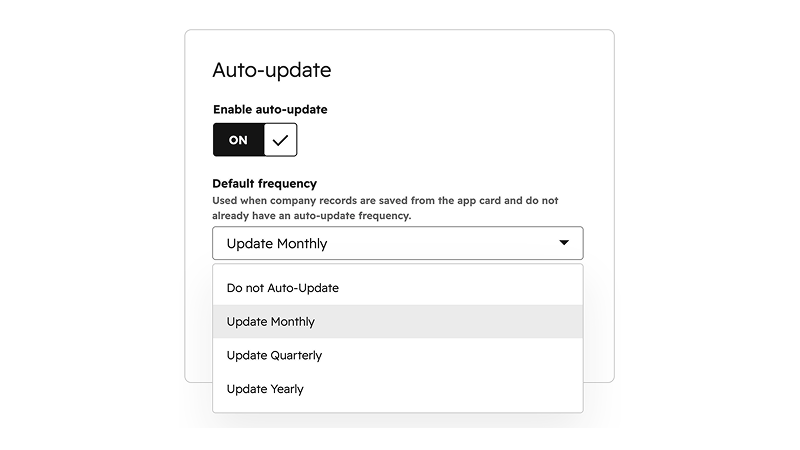
If Enable auto-update is turned off, no company records will be auto-updated, even if individual records have an update frequency selected.
The default frequency is used when a company record is saved from the App Card and that record does not already have an auto-update frequency.
How records are selected
Companies House LookUp uses three HubSpot company properties to decide which records need an auto-update:
- Company Number: used to find the company in Companies House.
- Update Frequency: controls whether the record should update monthly, quarterly, yearly, or not at all.
- Date last saved: stores when Companies House LookUp last saved Companies House data to the HubSpot record.
The app runs its auto-update scan hourly, but accounts are staggered, so your account is normally checked once per day at its assigned hour. When a company record is due, it is queued and refreshed from Companies House using the saved company number.
Auto-update is not instant. If a Companies House record changes today, Companies House LookUp will refresh your HubSpot record when it next becomes due based on its selected frequency and your account's scheduled check.
Choose an update frequency
There are three ways to set the update frequency for company records.
Default frequency in App Settings
The default frequency applies when a company is saved from the App Card and that HubSpot record does not already have an update frequency.
Workflow action setting
When a company is saved or updated by a Companies House LookUp workflow action, the update frequency selected in the workflow action is saved to the company record.
Manual or bulk updates in HubSpot
Update Frequency is a standard HubSpot property created by Companies House LookUp. You can update it on individual records, change it in bulk from HubSpot views, imports, or workflows, and use Do not Auto-Update for records that should be excluded.
The available options are managed by Companies House LookUp and cannot be customised in HubSpot.
Credits and billing
Auto-update requires a Pro subscription or Pro trial. Each successful company update uses 1 credit. If an update fails or is skipped, it does not use a credit.
If your account runs out of credits, due records will not be updated at that time. You can see your credit status from App Settings. When credits are available again, eligible records will be picked up in a later auto-update check because their Date last saved will still be older than the selected frequency.
To estimate usage, divide the number of company records you want to auto-update by the update period. For example, 800 company records set to quarterly will usually use about 200 credits per month.
Usage can vary depending on when records were first saved, how many new companies are added, and how update frequencies are distributed. Allow some extra credits for that variation.
What auto-update does not do
- It does not auto-update contact records.
- It does not update company records where Update Frequency is set to Do not Auto-Update.
- It does not update company records without a saved Company Number - use workflow actions for this.
- It does not refresh records instantly when Companies House data changes.
- It does not use credits for updates that fail or are skipped because the account is out of credits or does not have access to auto-update.