


Use Companies House LookUp workflow actions in HubSpot
7 minute read · Last updated 9 October 2026
Use Companies House LookUp workflow actions to search Companies House and save matching company data to the enrolled HubSpot company record.
Before you start
Companies House LookUp workflow actions run on HubSpot company workflows. They search Companies House and save the matching Companies House data to the enrolled HubSpot company record.
Workflow actions require a Pro subscription. If the connected account does not have the right subscription, the workflow action will return an Incorrect subscription error.
Daily workflow limit: the standard limit is 3,000 records per HubSpot account per day, shared across both workflow actions and all workflows. The allowance resets at midnight UTC.
For larger imports, split enrollment across multiple days. Once the limit is reached, additional records receive a Daily workflow limit reached error and are not queued or charged. Run those records through the action again after the reset time shown in the error; they will not restart automatically.
For name-based searches, ask for the Registered Company Name in your forms, imports, or enrichment process. HubSpot's standard company name often stores a trading name or short name, which may not match Companies House.
Choose the right workflow action
Companies House LookUp includes two workflow actions for company records:
- Search by Company Number: use this when you have an exact UK company number.
- Search by Registered Company Name: use this when you have asked for the company's registered Companies House name.
Company number is the most reliable option because Companies House company numbers are unique. Registered company name search is useful when you do not have a company number, but it is intentionally strict so the workflow does not save data to the wrong HubSpot record.
Search by company number
Use Search by Company Number when a HubSpot company record already has a Companies House company number, or when your workflow captures one from a form, import, integration, or enrichment step.
- Add the Search by Company Number action to a company workflow.
- Set Target record to Enrolled company.
- Map Company Number to the HubSpot property that stores the company number.
- Choose the update frequency for the action.
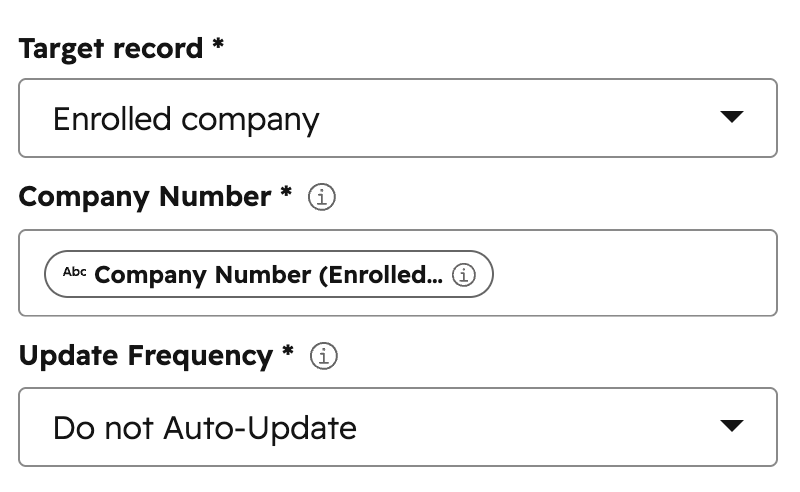
This action can also be used to manually refresh existing records. For example, map Company Number to the existing Companies House LookUp company number property on the enrolled company, then run the workflow for records you want to update.
The company number action only works with an exact Companies House company number. If the company number is wrong or does not exist, the action returns No results found.
Search by registered company name
Use Search by Registered Company Name when your HubSpot data includes the official Companies House registered company name. This should not usually be mapped to HubSpot's standard Company name property unless you know that property stores the registered legal name.
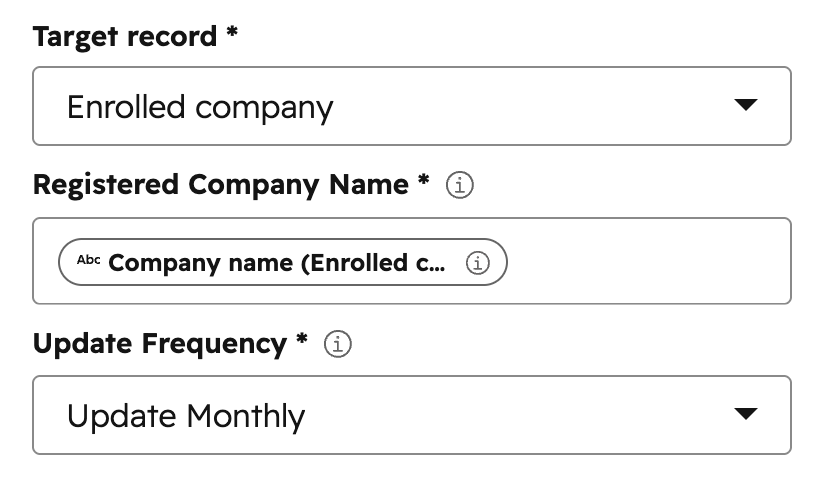
- Add the Search by Registered Company Name action to a company workflow.
- Set Target record to Enrolled company.
- Map Registered Company Name to the HubSpot property that stores the official registered name.
- Choose the update frequency for the action.
How company-name matching works
The registered company name action searches Companies House, then only saves the data if it can find one exact match. Matching ignores punctuation and case. It also checks common Ltd and Limited endings.
For example, if the workflow searches for Weave + Blend, it checks:
- Weave + Blend
- Weave + Blend Limited
- Weave + Blend Ltd
If the workflow searches for Weave + Blend Ltd, it can also match Weave + Blend Limited. The same works the other way round: Weave + Blend Limited can match Weave + Blend Ltd.
The workflow does not choose between multiple possible companies. If the search could refer to more than one company, the action returns Multiple matches found and does not save any Companies House data.
When to use the App Card instead
The App Card is a better fit when a person should review the search results before saving. This is common when your HubSpot record contains a trading name, brand name, group name, or incomplete legal name.
For example, Company LookUp could actually be:
- Weave + Blend Limited
- Weave + Blend Group Limited
- Weave + Blend Holdings Ltd
In cases like this, open Companies House LookUp from the HubSpot record, review the search results in the App Card, and save the correct company manually.
Workflow results and errors
If the workflow action finds exactly one matching Companies House company, it saves the data to the enrolled HubSpot company record and updates the Date last saved property.
If the action cannot save the data, it returns one of these errors:
- No results found: the company number does not exist, or the name search did not find any Companies House results.
- Multiple matches found: the name search found results, but the workflow could not identify one exact registered company.
- Incorrect subscription: the connected account does not have access to workflow actions.
- Reached credit limit: the account has reached its available save limit.
- Daily workflow limit reached: the account has reached its daily workflow allowance (3,000 records as standard). Run the action again after the reset time shown in the error.
- Could not perform search: Companies House or HubSpot could not complete the request.