


How plans and credits work
7 minute read · Last updated 15 July 2026
Understand Companies House LookUp plans, monthly credit limits, what uses credits, and how to manage billing from App Settings.
Plans
Companies House LookUp is billed per HubSpot portal, not per user. Once the app is installed, everyone with access to the connected HubSpot portal can use it.
Every installation starts with a 14-day Pro trial. During the trial, you can test Pro features before choosing whether to move to a paid plan.
Free
The Free plan includes:
- 10 credits per month.
- Search from HubSpot company and contact records.
- Save Companies House data to HubSpot properties.
- Unlimited users in the connected HubSpot portal.
Pro
The Pro plan includes:
- 200 credits per month.
- Everything in Free.
- Enhanced financial and employee data, where available from Companies House.
- HubSpot workflow actions.
- Monthly, quarterly, or yearly auto-updates.
- Unlimited users in the connected HubSpot portal.
Pro trial
The 14-day Pro trial includes Pro features and 50 trial credits. When the trial ends, you can upgrade to Pro to keep using Pro features such as workflow actions, auto-updates, and enhanced financial data. If you do not upgrade, your account moves to the Free plan.
What credits are used for
A credit is used when Companies House LookUp saves or updates data in HubSpot. Each successful save or update uses 1 credit.
This includes:
- Saving a company record from the App Card.
- Saving a contact or officer record from the App Card.
- Updating a record using a HubSpot workflow action.
- Automatically updating a company record through auto-update.
Searching and viewing Companies House data is free. Credits are only used when data is written to HubSpot.
If a save or update fails, it does not use a credit.
Monthly credit limits
Credits reset each month. You can see your current credit usage, credit limit, and reset date from the Companies House LookUp App Settings screen in HubSpot.
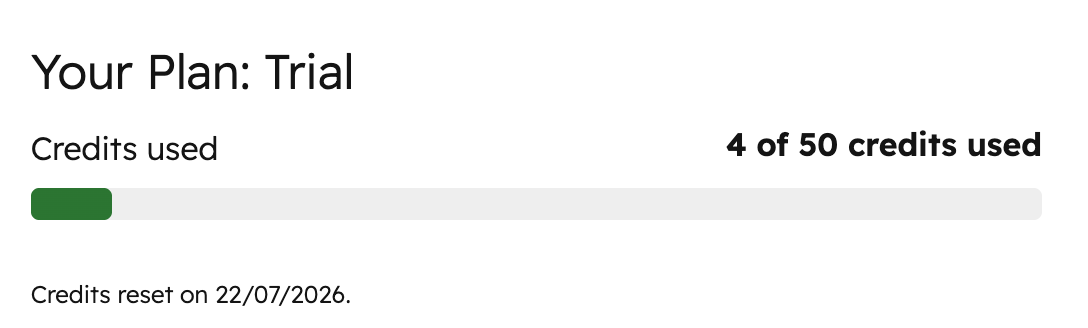
The standard credit limits are:
- Free: 10 credits per month.
- Pro trial: 50 credits during the trial.
- Pro: 200 credits per month.
Unused credits do not roll over. Your usage resets at the start of the next credit period.
Credit add-ons
If you need more than the credits included with Pro, you can add extra monthly credits from App Settings.
Available add-ons are:
- 500 extra credits per month.
- 3,000 extra credits per month.
Add-ons increase your monthly credit limit. For example, Pro with the 500 credit add-on gives you 700 credits per month in total.
You can add more credits later from App Settings. If you need a different combination of credits, contact support and we can create a custom plan.
What happens when you run out of credits
If your account runs out of credits, Companies House LookUp cannot save or update more records until credits are available again.
You can still search and view Companies House data, but actions that write data to HubSpot will be blocked. This can affect:
- Manual saves from the App Card.
- Workflow actions.
- Auto-updates.
For auto-updates, records that are skipped because your account is out of credits can be picked up again in a later auto-update check once credits are available.
To continue saving data before your next reset date, upgrade your plan or add a credit pack from App Settings.
Billing and payment
Pro can be paid monthly or annually. Monthly billing has a one-month minimum term. Annual billing has a 12-month minimum term and includes a 15% saving compared with monthly billing.
Prices exclude VAT. VAT will be added at the standard rate where applicable. Payments are currently accepted by credit card only.
You can manage your subscription from App Settings. If you cancel, you retain access until your renewal date.
Estimate how many credits you need
To estimate your credit usage, count how many records you expect to save or update each month.
For example:
- Saving 40 company records and 20 contact records uses 60 credits.
- Running a workflow that updates 100 company records uses 100 credits.
- Auto-updating 800 company records quarterly will usually use about 200 credits per month.
Your actual usage may vary if you add new records, run bulk workflows, or change auto-update frequencies.
Check usage and manage your plan
Open Companies House LookUp in HubSpot and go to App Settings. The plan section shows:
- Your current plan.
- Credits used.
- Your credit limit.
- Your credit reset date.
- Subscription management options.
Use this screen to monitor usage, upgrade to Pro, add credit packs, or manage your subscription.
FAQs
Are the prices excluding VAT?
Yes. VAT will be added at the standard rate. If you are outside the UK and not subject to VAT, please get in touch with us.
What payment methods are accepted?
We currently accept credit card payments only.
Can I choose a different combination of credits?
Yes. Contact us and we can create a custom plan for you.
What's the minimum term? How do I cancel?
Monthly billing has a one-month minimum term. Annual billing has a 12-month minimum term. You can cancel at any time from App Settings, and you will retain access until your renewal date.
Can I upgrade to add more credits at a later date?
Yes. You can add more credits later from App Settings.